Financial security analysts are warning customers of digital banking services, like Revolut, about a sophisticated new phishing scam. This scheme uses manipulation and threats to trick unsuspecting users into sending their own money to criminals.
How the "Mistaken Transfer" Trap Works
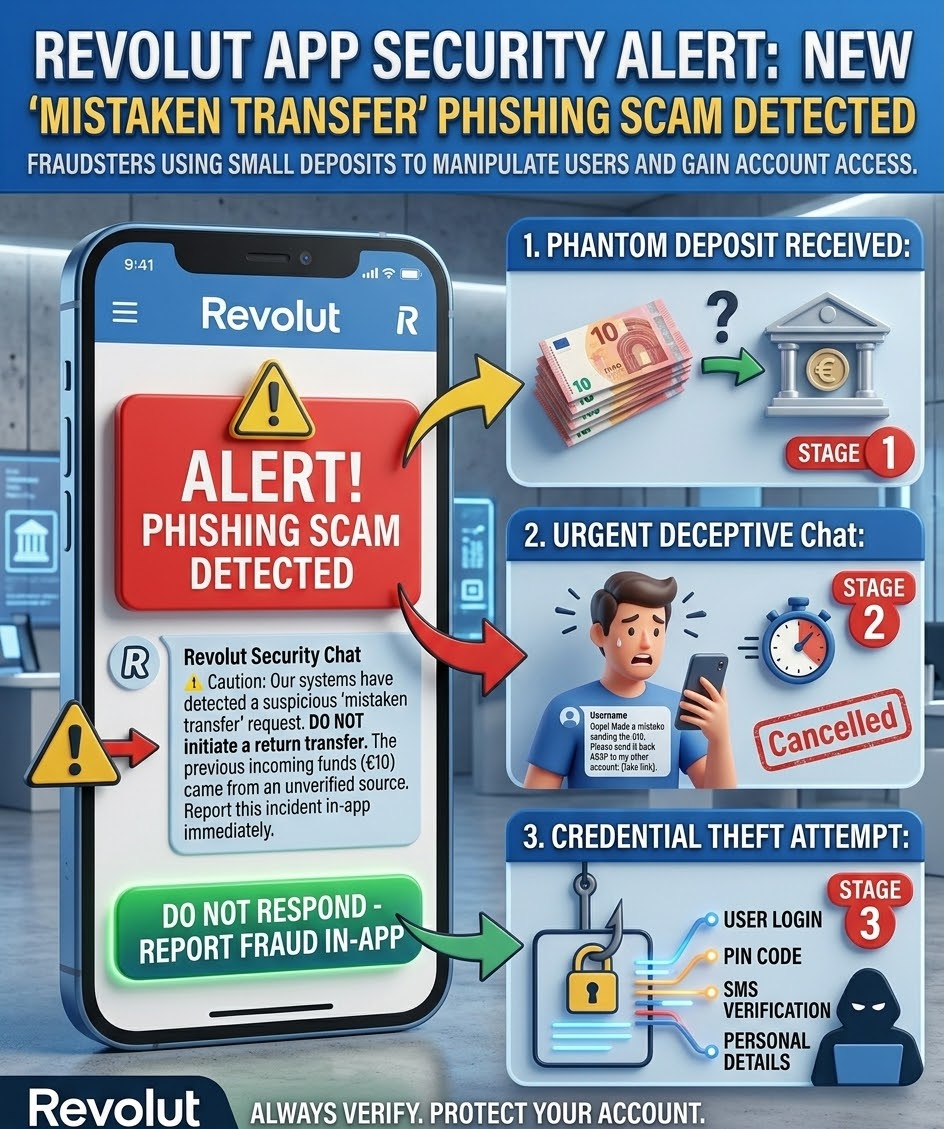
The fraud generally proceeds in several stages, moving quickly to cause confusion and panic:
- The Phantom Deposit: You unexpectedly receive a small, legitimate-looking transaction into your digital account from an unknown sender. The amount is often small, designed to bypass initial suspicion.
- The Urgent Plea and Threat: Shortly after, you are contacted by the "sender" via in-app chat, call or SMS. They claim they made a simple typo when sending money, perhaps to a charity or a family member, and ask you to transfer it back immediately.
Scam Message: "Hi, so sorry, I sent you €10 by mistake! It was for a charity donation. Please send it back ASAP. If you don't, I will report your account and get it cancelled for theft."
3. Manufactured Urgency: The scammer leverages psychological pressure, threatening legal action or account suspension if you do not comply instantly. They aim to make you react before you think.
The Real Intent: Account Phishing and Unauthorized Access
While the scammer is trying to get you to send them money, the ultimate goal can be far more serious:
- Account Takeover: If you initiate a return transfer based on their request, they may attempt to trick you into clicking a malicious link (phishing) to capture your login credentials.
- Unauthorized Access: The money they sent may have been sourced from stolen credit cards or other hacked accounts. The transfer you send back may expose your own details, which they can use for further fraud.
Do NOT Fall Victim: Essential Safety Steps
Digital banking security teams emphasize that no external user has the power to cancel your account. If you receive a mysterious transfer and follow-up message:
- DO NOT TRANSFER THE MONEY BACK. Ignore the sender's requests.
- Immediately Block the Sender within your banking app's security features.
- REPORT THE INCIDENT using the official in-app fraud reporting tools (e.g., "Report Fraud" or "Chat with Us" via security settings). Let the bank's security experts handle the irregular transfer.
- Be Wary of Links: Never click on suspicious links sent by unknown contacts, even if they seem urgent.